[Syzkaller I]Get start
Syzkaller is the start-of-the-art kernel fuzzer.
Syzkaller takes in a collection of syscall descriptions provided by human experts as template , which provide the fuzzer awareness of the type and arguments of syscalls to be called and dependencies between syscalls . Then the fuzzer randomly generates test cases based on the template , start a kernel to run the test cases , meanwhile monitor the kernel state and collect crash reports.
0x0 TL;DR
This post will take a look at the Syzkaller environment setup , and I will provide an ez demo to report a heap overflow in a kernel module. Hopefully my time consuming debugging process can help you . Let's go.
0x1 setup
0.enable cpu feature kvm
inspect the cpuinfo to make sure cpu support the kvm feature
- for intel:
- for AMD:
1.setup golang environment
Golang version is 1.23.4 up to that time.
add Gopath to environment
run go version to check Golang environment
2.build Syzkaller
ensure your golang environment
3.compile Linux kernel
take Linux 5.14 for example
wget https://mirrors.edge.kernel.org/pub/linux/kernel/v5.x/linux-5.14.tar.xz
tar -xf linux-5.14.tar.xz
cd linux-5.14
make defconfig
then append the following CONFIGS to .config
CONFIG_KCOV=y
CONFIG_KCOV_INSTRUMENT_ALL=y
CONFIG_KCOV_ENABLE_COMPARISONS=y
CONFIG_DEBUG_FS=y
CONFIG_DEBUG_KMEMLEAK=y
CONFIG_DEBUG_INFO_DWARF_TOOLCHAIN_DEFAULT=y
CONFIG_KALLSYMS=y
CONFIG_KALLSYMS_ALL=y
CONFIG_CONFIGFS_FS=y
CONFIG_SECURITYFS=y
CONFIG_NAMESPACES=y
CONFIG_UTS_NS=y
CONFIG_IPC_NS=y
CONFIG_PID_NS=y
CONFIG_NET_NS=y
CONFIG_CGROUP_PIDS=y
CONFIG_MEMCG=y
CONFIG_CMDLINE_BOOL=y
CONFIG_CMDLINE="net.ifnames=0"
CONFIG_KASAN=y
CONFIG_KASAN_INLINE=y
more configs :
https://github.com/google/syzkaller/blob/master/docs/linux/kernel_configs.md
the compile the kernel
this will take for a while when you get a bootable kernel image .
4.build virtual hard disk
to build a disk image with MBR and basic file system
this will take for a while when you get bullseye.img as the disk image and two ssh key file
bullseye is the release name of Debian up to that time.
5.build QEMU
6.run the kernel
qemu-system-x86_64 \
    -m 2G \
    -smp 2 \
    -no-reboot \
    -kernel /path/to/linux-5.14/arch/x86/boot/bzImage \
    -append "console=ttyS0 root=/dev/sda earlyprintk=serial net.ifnames=0" \
    -drive file=/path/to/syzkaller/image/bullseye.img,format=raw \
    -net user,hostfwd=tcp:127.0.0.1:10021-:22 \
    -net nic,model=e1000 \
    -enable-kvm \
    -nographic \
    -pidfile vm.pid 2>&1 | tee vm.log
Login as root without password
errors :
check this post :
https://stackoverflow.com/questions/75641274/network-backend-user-is-not-compiled-into-this-binary
then make sure ssh is avaliable
7.start SyzKaller
and edit a config file saved as default.cfg
{
        "target": "linux/amd64",
        "http": "127.0.0.1:56741",
        "workdir": "/path/to/syzkaller/workdir",
        "kernel_obj": "/path/to/linux-5.14/",
        "image": "/path/to/syzkaller/image/bullseye.img",
        "sshkey": "/path/to/syzkaller/image/bullseye.id_rsa",
        "syzkaller": "/path/to/syzkaller/",
        "procs": 8,
        "type": "qemu",
        "vm": {
                "count": 4,
                "kernel": "/path/to/linux-5.14/arch/x86/boot/bzImage",
                "cpu": 2,
                "mem": 2048 ,
                "cmdline": "net.ifnames=0"
        }
}
run Syzkaller by:
meanwhile explorer 127.0.0.1:56741 to get a view of the current fuzzing state
0x2 demo
take a kernel heap overflow for example.
1.build a vulnability kernel module
this module contains a heap overflow in function proc_write, and we will compile it directly into the kernel
up to 4096 bytes can be written to a narrow 512 Byte slab object in cache kmalloc-512
#include <linux/init.h>
#include <linux/module.h>
#include <linux/proc_fs.h>
#include <linux/uaccess.h>
#include <linux/slab.h>


static int proc_open (struct inode *proc_inode, struct file *proc_file)
{
    printk(":into open!\n");
    return 0;
}

static ssize_t proc_read (struct file *proc_file, char __user *proc_user, size_t n, loff_t *loff)
{
    printk(":into read");
    return 0;
}

static ssize_t proc_write (struct file *proc_file, const char __user *proc_user, size_t n, loff_t *loff)
{
    char *c = kmalloc(512, GFP_KERNEL);
    copy_from_user(c, proc_user, 4096);
    printk(":into write!\n");
    return 0;
}

static struct proc_ops test_op = {
    .proc_open = proc_open,
    .proc_read = proc_read,
    .proc_write = proc_write,
};

static int __init mod_init(void)
{
    proc_create("test1", S_IRUGO|S_IWUGO, NULL, &test_op);
    printk(":proc init over!\n");
    return 0;
}

module_init(mod_init);
save as linux-5.14/drivers/char/testxy.c
then append following to
linux-5.14/drivers/char/Kconfig
config TESTXY_MODULE
  tristate "dustball's vulnability module"
  default y
  help
    This file is to test a buffer overflow
then append following to
linux-5.14/drivers/char/Makefile
reconfig the kernel with
make menuconfig
we can find the module @Device Drivers/dustball's vulnability module
*means compile into the kernel, chosen
Mmeans compile as independent module
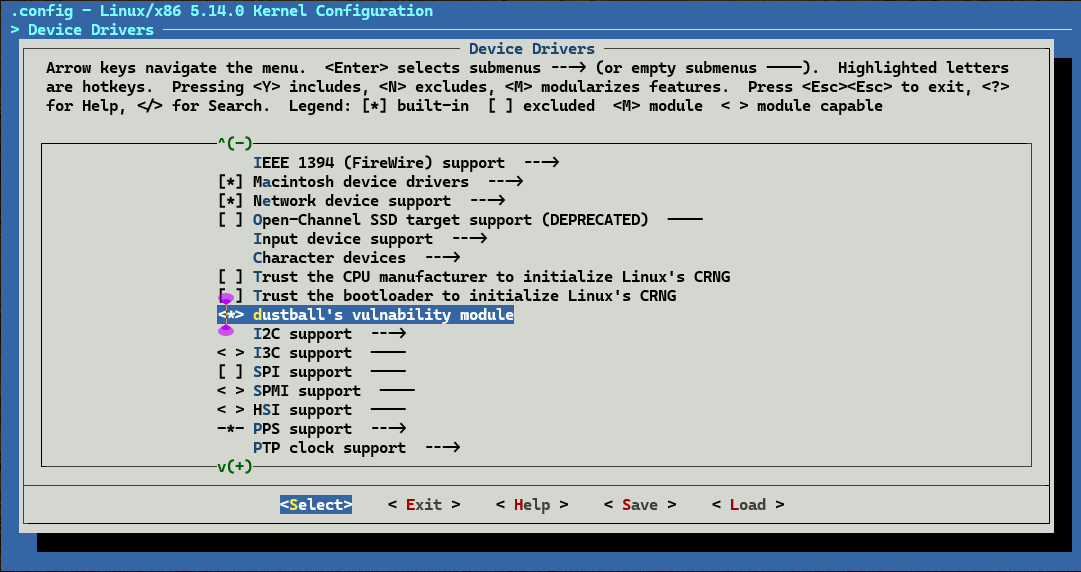
recompile the kernel
rerun the kernel and check the module loaded
2.provide syscall descriptions
2.1 save the following syscall descriptions as
/syzkaller/sys/linux/proc_testxy.txt
include <linux/fs.h>
open$testxy(file ptr[in, string["/proc/test1"]], flags flags[proc_open_flags], mode flags[proc_open_mode]) fd
read$testxy(fd fd, buf buffer[out], count len[buf])
write$testxy(fd fd, buf buffer[in], count len[buf])

proc_open_flags = O_RDONLY, O_WRONLY, O_RDWR, O_APPEND, FASYNC, O_CLOEXEC, O_CREAT, O_DIRECT, O_DIRECTORY, O_EXCL, O_LARGEFILE, O_NOATIME, O_NOCTTY, O_NOFOLLOW, O_NONBLOCK, O_PATH, O_SYNC, O_TRUNC, __O_TMPFILE
proc_open_mode = S_IRUSR, S_IWUSR, S_IXUSR, S_IRGRP, S_IWGRP, S_IXGRP, S_IROTH, S_IWOTH, S_IXOTH
more syzlang :
https://github.com/google/syzkaller/blob/master/docs/syscall_descriptions_syntax.md
2.2 extract necessary information like syscall numbers and macro values using syz-extract
cd /path/to/syzkaller
./bin/syz-extract -os linux -arch amd64 -sourcedir "/path/to/linux-5.14" proc_testxy.txt
check syzkaller/sys/linux/proc.testxy.txt.const when finished
2.3 generate syzkaller-awareness datastructure in golang
check syzkaller/executor/syscalls.h to find read$testxy when finished
2.4 rebuild Syzkaller
3.start Syzkaller
edit a test.cfg file
{
        "target": "linux/amd64",
        "http": "127.0.0.1:56741",
        "workdir": "/path/to/syzkaller/workdir",
        "kernel_obj": "/path/to/linux-5.14/",
        "image": "/path/to/syzkaller/image/bullseye.img",
        "sshkey": "/path/to/syzkaller/image/bullseye.id_rsa",
        "syzkaller": "/path/to/syzkaller/",
        "procs": 8,
        "type": "qemu",
        "sandbox": "setuid",
            "enable_syscalls":[
                "open$testxy",
                "read$testxy",
                "write$testxy"
        ],
        "vm": {
                "count": 1,
                "kernel": "/path/to/linux-5.14/arch/x86/boot/bzImage",
                "cpu": 2,
                "mem": 2048 ,
                "cmdline": "net.ifnames=0"
        }
}
then run Syzkaller by
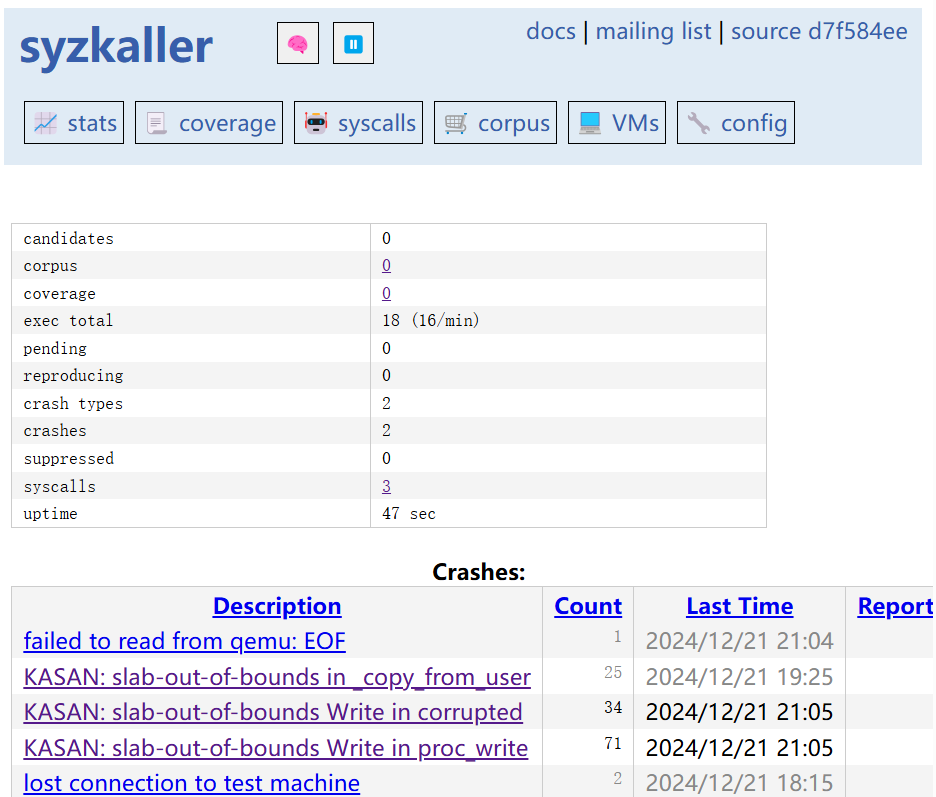
visit http://127.0.0.1:56741/ and wait for crash reports
0x3 see also
https://blingblingxuanxuan.github.io/2019/10/26/syzkaller/