调试技巧
gdb
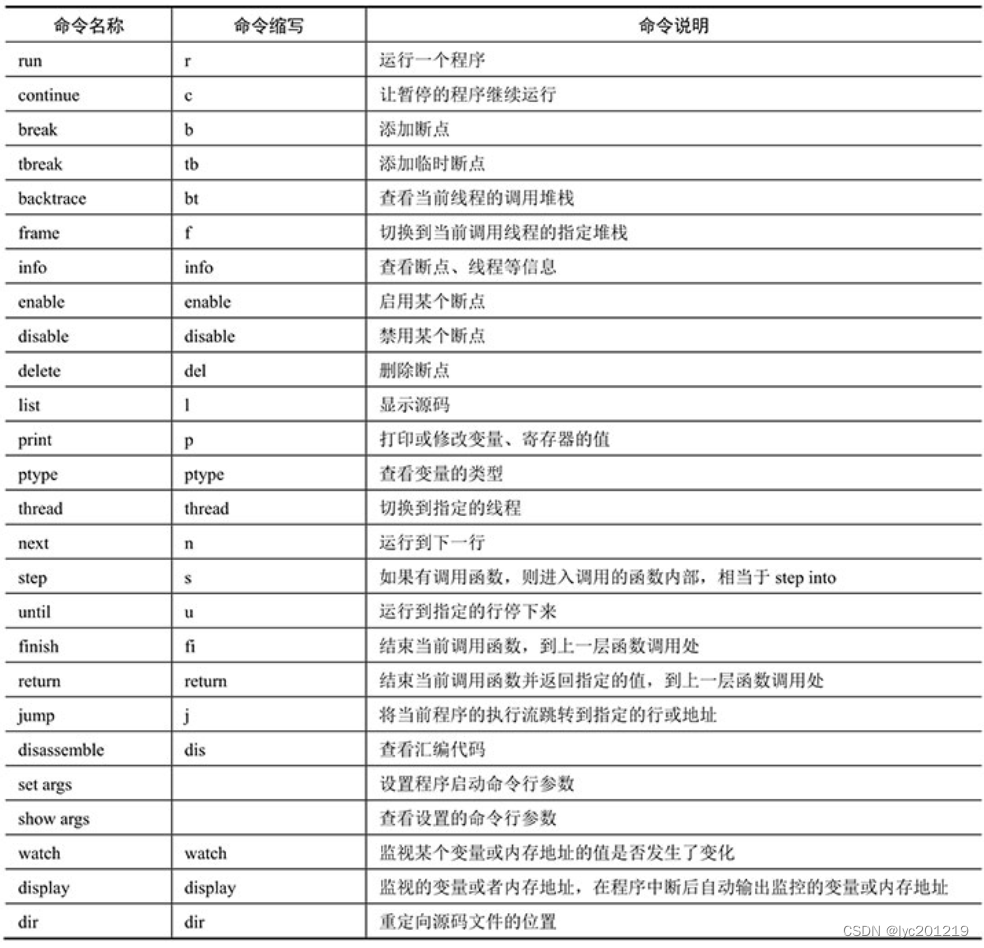
基础命令
pwndbg加强命令
address              Print virtual memory map pages. Results can be filtered by providing address/module name.
arena                Print the contents of an arena, default to the current thread's arena.
arenas               List this process's arenas.
argc                 Prints out the number of arguments.
args                 Prints out the contents of argv.
argv                 Prints out the contents of argv.
aslr                 Check the current ASLR status, or turn it on/off.
auxv                 Print information from the Auxiliary ELF Vector.
bash                 Invokes bash
bc                   Clear the breakpoint with the specified index.
bd                   Disable the breakpoint with the specified index.
be                   Enable the breakpoint with the specified index.
bins                 Print the contents of all an arena's bins and a thread's tcache, default to the current thread's arena and tcache.
bl                   List breakpoints.
bp                   Set a breakpoint at the specified address.
brva                 Alias for breakrva.
canary               Print out the current stack canary.
cpsr                 Print out ARM CPSR or xPSR register
ctx                  Print out the current register, instruction, and stack context.
da                   Dump a string at the specified address.
date                 Invokes date
db                   Starting at the specified address, dump N bytes.
dc                   Starting at the specified address, hexdump.
dd                   Starting at the specified address, dump N dwrods.
dds                  Dump pointers and symbols at the specified address.
distance             Print the distance between the two arguments.
down                 Select and print stack frame called by this one.
dps                  Dump pointers and symbols at the specified address.
dq                   Starting at the specified address, dump N qwords.
dqs                  Dump pointers and symbols at the specified address.
ds                   Dump a string at the specified address.
dt                   Dump out information on a type (e.g. ucontext_t).
dumpargs             Prints determined arguments for call instruction.
dw                   Starting at the specified address, dump N words.
eb                   Write hex bytes at the specified address.
ed                   Write hex dwords at the specified address.
egrep                Invokes egrep
elfheader            Prints the section mappings contained in the ELF header.
emulate              Like nearpc, but will emulate instructions from the current $PC forward.
entry                Set a breakpoint at the first instruction executed in
env                  Prints out the contents of the environment.
environ              Prints out the contents of the environment.
envp                 Prints out the contents of the environment.
eq                   Write hex qwords at the specified address.
errno                Converts errno (or argument) to its string representation.
ew                   Write hex words at the specified address.
ez                   Write a string at the specified address.
eza                  Write a string at the specified address.
fastbins             Print the contents of an arena's fastbins, default to the current thread's arena.
find_fake_fast       Find candidate fake fast chunks overlapping the specified address.
fsbase               Prints out the FS base address.  See also $fsbase.
getfile              Gets the current file.
getpid               Get the pid.
ghidra               Decompile a given function using ghidra
go                   Windbg compatibility alias for 'continue' command.
got                  Show the state of the Global Offset Table
gotplt               Prints any symbols found in the .got.plt section if it exists.
grep                 Invokes grep
gsbase               Prints out the GS base address.  See also $gsbase.
heap                 Iteratively print chunks on a heap, default to the current thread's active heap.
hexdump              Hexdumps data at the specified address or module name (or at $sp)
id                   Invokes id
init                 GDBINIT compatibility alias for 'start' command.
j                    Synchronize IDA's cursor with GDB
k                    Print a backtrace (alias 'bt').
kd                   Dump pointers and symbols at the specified address.
largebins            Print the contents of an arena's largebins, default to the current thread's arena.
leakfind             Attempt to find a leak chain given a starting address.
libs                 GDBINIT compatibility alias for 'libs' command.
lm                   Print virtual memory map pages. Results can be filtered by providing address/module name.
ln                   List the symbols nearest to the provided value.
main                 GDBINIT compatibility alias for 'main' command.
malloc_chunk         Print a chunk.
man                  Invokes man
memfrob              Memfrobs a region of memory.

mp                   Print the mp_ struct's contents.
mprotect             Calls mprotect. x86_64 only.

nearpc               Disassemble near a specified address.
nextcall             Breaks at the next call instruction
nextjmp              Breaks at the next jump instruction.
nextjump             Breaks at the next jump instruction.
nextproginstr        Breaks at the next instruction that belongs to the running program
nextret              Breaks at next return-like instruction
nextsc               Breaks at the next syscall not taking branches.
nextsyscall          Breaks at the next syscall not taking branches.
pc                   Windbg compatibility alias for 'nextcall' command.
pdisass              Compatibility layer for PEDA's pdisass command.
peb                  Not be windows.
pid                  Gets the pid.
piebase              Calculate VA of RVA from PIE base.
ping                 Invokes ping
pkill                Invokes pkill
plt                  Prints any symbols found in the .plt section if it exists.
probeleak            Pointer scan for possible offset leaks.
procinfo             Display information about the running process.
ps                   Invokes ps
pstree               Invokes pstree
pwd                  Invokes pwd
pwndbg               Prints out a list of all pwndbg commands. The list can be optionally filtered if filter_pattern is passed.
r2                   Launches radare2
r2pipe               Execute stateful radare2 commands through r2pipe
radare2              Launches radare2
regs                 Print out all registers and enhance the information.
reinit_pwndbg        Makes pwndbg reinitialize all state.
reload               Reload pwndbg.
retaddr              Print out the stack addresses that contain return addresses.
rm                   Invokes rm
rop                  Dump ROP gadgets with Jon Salwan's ROPgadget tool.
ropgadget            Dump ROP gadgets with Jon Salwan's ROPgadget tool.
ropper               ROP gadget search with ropper.
save_ida             Save the ida database.
search               Search memory for byte sequences, strings, pointers, and integer values
sed                  Invokes sed
sh                   Invokes sh
smallbins            Print the contents of an arena's smallbins, default to the current thread's arena.
so                   Sets a breakpoint on the instruction after this one
sort                 Invokes sort
ssh                  Invokes ssh
sstart               GDBINIT compatibility alias for 'tbreak __libc_start_main; run' command.
stack                dereferences on stack data with specified count and offset.
start                Set a breakpoint at a convenient location in the binary,
stepover             Sets a breakpoint on the instruction after this one
stepret              Breaks at next return-like instruction by 'stepping' to it
stepsc               Breaks at the next syscall by taking branches.
stepsyscall          Breaks at the next syscall by taking branches.
sudo                 Invokes sudo
tail                 Invokes tail
tcache               Print a thread's tcache contents, default to the current thread's tcache.
tcachebins           Print the contents of a tcache, default to the current thread's tcache.
telescope            Recursively dereferences pointers starting at the specified address
theme                Shows pwndbg-specific theme config. The list can be filtered.
themefile            Generates a configuration file for the current Pwndbg theme options
top                  Invokes top
top_chunk            Print relevant information about an arena's top chunk, default to current thread's arena.
touch                Invokes touch
try_free             Check what would happen if free was called with given address
u                    Starting at the specified address, disassemble N instructions.
uniq                 Invokes uniq
unsortedbin          Print the contents of an arena's unsortedbin, default to the current thread's arena.
up                   Select and print stack frame that called this one.
version              Displays gdb, python and pwndbg versions.
vi                   Invokes vi
vim                  Invokes vim
vis_heap_chunks      Visualize chunks on a heap, default to the current arena's active heap.
vmmap                Print virtual memory map pages. Results can be filtered by providing address/module name.
vmmap_add            Add Print virtual memory map page.
vmmap_clear          Clear the vmmap cache.
vmmap_load           Load virtual memory map pages from ELF file.
vprot                Print virtual memory map pages. Results can be filtered by providing address/module name.
w                    Invokes w
wget                 Invokes wget
who                  Invokes who
whoami               Invokes whoami
xinfo                Shows offsets of the specified address to useful other locations
xor                  XOR `count` bytes at address` with the key key`.
xpsr                 Print out ARM xPSR or CPSR register
xuntil               Continue execution until an address or function.
查看结构的定义位置
pwndbg> info types FILE
All types matching regular expression "FILE":

File ../libio/bits/types/FILE.h:
7:      typedef struct _IO_FILE FILE;

File ../libio/bits/types/__FILE.h:
5:      typedef struct _IO_FILE __FILE;

File ../libio/bits/types/struct_FILE.h:
49:     struct _IO_FILE;

File ../libio/libioP.h:
325:    struct _IO_FILE_plus;

File ./libio/libioP.h:
325:    struct _IO_FILE_plus;

File ./libio/memstream.c:
24:     struct _IO_FILE_memstream;

File ./libio/wmemstream.c:
25:     struct _IO_FILE_wmemstream;

File /usr/include/x86_64-linux-gnu/bits/types/FILE.h:
7:      typedef struct _IO_FILE FILE;

File /usr/include/x86_64-linux-gnu/bits/types/struct_FILE.h:
49:     struct _IO_FILE;
针对函数
| 功能 | 命令 |
|---|---|
| 查看函数签名 | ptype printf |
| 查看函数地址 | p printf |
| 查看函数源代码 | list printf |
| 设置源代码行数 | set listsize 100 |
| 查看函数反汇编 | disassemble printf |
| 查看函数符号所在文件 | info functions printf |
| 查看当前函数参数 | info args |
| 查看调用栈 | bt |
| 查看返回地址 | retaddr |
| 查看 |
针对结构体
| 功能 | 命令 | |
|---|---|---|
| 查看结构体定义 | ptype FILE | |
| 查看结构体所在文件 | info types FILE | |
| 将某基地址作为某结构体打印 | p *(FILE*)0x80052a0 |
针对保护
gcc编译选项
| 保护 | 作用 | 编译选项 |
|---|---|---|
| NX | 堆栈不可执行,防止在堆栈中写 shellcode |
-z execstack / -z noexecstack (关闭 / 开启) |
| Canary | 金丝雀,防止缓冲区溢出,隔离缓冲区和返回地址 | -fno-stack-protector /-fstack-protector / -fstack-protector-all(关闭 / 开启 / 全开启) |
| PIE | 位置无关可执行文件,动态库的加载位置随机或者固定 | -no-pie / -pie (关闭 / 开启) |
| RELRO | GOT表只读保护,防止篡改劫持 GOT跳转表 |
-z norelro / -z lazy / -z now(关闭 / 部分开启 / 完全开启) |
ASLR,操作系统提供的保护
如果使用gdb调试,可以直接使用 aslr on /aslr off临时关闭或者开启对本程序的保护
/proc/sys/kernel/randomize_va_space这个文件里写0/½
0 表示 ASLR 完全禁用。
1 表示启用 ASLR(地址空间中的库、堆和栈都会被随机化)。
2 表示启用 ASLR,但栈仍然以固定地址分配。
针对符号
| 功能 | 命令 |
|---|---|
| 查看符号所属模块 | info symbol printf |
| 查看当前执行模块源文件 | info source |
针对内存布局
| 功能 | 命令 |
|---|---|
| 查看虚拟内存整体布局 | lm |
| 查看动态库布局 | info dll |
| 查看调用栈 | bt或者info stack |
| 查看符号地址 | info address printf |
| 各节区段的分布 | info target或者elfsections |
| 查看pie基地址 | piebase |
| 打印address开始,直到NULL结束的字符串 | da <address> |
针对堆栈
| 功能 | 命令 |
|---|---|
| 查看当前堆栈 | stack |
| 查看金丝雀 | canary |
针对堆
| 功能 | 命令 |
|---|---|
| 查看虚拟内存整体布局 | lm |
| 查看动态库布局 | info dll |
| 查看调用栈 | bt或者info stack |
| 查看符号地址 | info address printf |
| 各节区段的分布 | info target |
多进程
| 功能 | 命令 | 备注 |
|---|---|---|
| 设置调试模式 | set detach-on-fork [on | off] |
|
| 查看可调试进程 | info inferiors |
|
| 切换调试进程 | inferior <pid> |
|
| 子进程启动后调试子进程 | set follow-fork-mode child |
多线程
内核调试
monitor相关
| 指令 | 作用 | |
|---|---|---|
| monitor xp/10gx 0 | 查看物理地址 | |
| monitor x/10gx 0 | 查看虚拟地址 | |
| monitor system_reset | 重启 | |
| monitor info registers | 查看所有寄存器 | |
| monitor info cpus | 查看所有cpu与所属线程 |
pwndbg> monitor help
acl_add aclname match allow|deny [index] -- add a match rule to the access control list
acl_policy aclname allow|deny -- set default access control list policy
acl_remove aclname match -- remove a match rule from the access control list
acl_reset aclname -- reset the access control list
acl_show aclname -- list rules in the access control list
balloon target -- request VM to change its memory allocation (in MB)
block_job_cancel [-f] device -- stop an active background block operation (use -f
                         if the operation is currently paused)
block_job_complete device -- stop an active background block operation
block_job_pause device -- pause an active background block operation
block_job_resume device -- resume a paused background block operation
block_job_set_speed device speed -- set maximum speed for a background block operation
block_passwd block_passwd device password -- set the password of encrypted block devices
block_resize device size -- resize a block image
block_set_io_throttle device bps bps_rd bps_wr iops iops_rd iops_wr -- change I/O throttle limits for a block drive
block_stream device [speed [base]] -- copy data from a backing file into a block device
boot_set bootdevice -- define new values for the boot device list
change device filename [format [read-only-mode]] -- change a removable medium, optional format
chardev-add args -- add chardev
chardev-change id args -- change chardev
chardev-remove id -- remove chardev
chardev-send-break id -- send a break on chardev
client_migrate_info protocol hostname port tls-port cert-subject -- set migration information for remote display
closefd closefd name -- close a file descriptor previously passed via SCM rights
commit device|all -- commit changes to the disk images (if -snapshot is used) or backing files
cpu index -- set the default CPU
cpu-add id -- add cpu
c|cont  -- resume emulation
delvm tag|id -- delete a VM snapshot from its tag or id
device_add driver[,prop=value][,...] -- add device, like -device on the command line
device_del device -- remove device
drive_add [-n] [[<domain>:]<bus>:]<slot>
[file=file][,if=type][,bus=n]
[,unit=m][,media=d][,index=i]
[,cyls=c,heads=h,secs=s[,trans=t]]
[,snapshot=on|off][,cache=on|off]
[,readonly=on|off][,copy-on-read=on|off] -- add drive to PCI storage controller
drive_backup [-n] [-f] [-c] device target [format] -- initiates a point-in-time
                        copy for a device. The device's contents are
                        copied to the new image file, excluding data that
                        is written after the command is started.
                        The -n flag requests QEMU to reuse the image found
                        in new-image-file, instead of recreating it from scratch.
                        The -f flag requests QEMU to copy the whole disk,
                        so that the result does not need a backing file.
                        The -c flag requests QEMU to compress backup data
                        (if the target format supports it).

drive_del device -- remove host block device
drive_mirror [-n] [-f] device target [format] -- initiates live storage
                        migration for a device. The device's contents are
                        copied to the new image file, including data that
                        is written after the command is started.
                        The -n flag requests QEMU to reuse the image found
                        in new-image-file, instead of recreating it from scratch.
                        The -f flag requests QEMU to copy the whole disk,
                        so that the result does not need a backing file.

dump-guest-memory [-p] [-d] [-z|-l|-s] filename [begin length] -- dump guest memory into file 'filename'.
                        -p: do paging to get guest's memory mapping.
                        -d: return immediately (do not wait for completion).
                        -z: dump in kdump-compressed format, with zlib compression.
                        -l: dump in kdump-compressed format, with lzo compression.
                        -s: dump in kdump-compressed format, with snappy compression.
                        begin: the starting physical address.
                        length: the memory size, in bytes.
eject [-f] device -- eject a removable medium (use -f to force it)
expire_password protocol time -- set spice/vnc password expire-time
gdbserver [device] -- start gdbserver on given device (default 'tcp::1234'), stop with 'none'
getfd getfd name -- receive a file descriptor via SCM rights and assign it a name
gpa2hpa addr -- print the host physical address corresponding to a guest physical address
gpa2hva addr -- print the host virtual address corresponding to a guest physical address
help|? [cmd] -- show the help
host_net_add tap|user|socket|vde|netmap|bridge|vhost-user|dump [options] -- add host VLAN client (deprecated, use netdev_add instead)
host_net_remove vlan_id name -- remove host VLAN client (deprecated, use netdev_del instead)
hostfwd_add [vlan_id name] [tcp|udp]:[hostaddr]:hostport-[guestaddr]:guestport -- redirect TCP or UDP connections from host to guest (requires -net user)
hostfwd_remove [vlan_id name] [tcp|udp]:[hostaddr]:hostport -- remove host-to-guest TCP or UDP redirection
i /fmt addr -- I/O port read
info [subcommand] -- show various information about the system state
loadvm tag|id -- restore a VM snapshot from its tag or id
log item1[,...] -- activate logging of the specified items
logfile filename -- output logs to 'filename'
mce [-b] cpu bank status mcgstatus addr misc -- inject a MCE on the given CPU [and broadcast to other CPUs with -b option]
memsave addr size file -- save to disk virtual memory dump starting at 'addr' of size 'size'
migrate [-d] [-b] [-i] uri -- migrate to URI (using -d to not wait for completion)
                         -b for migration without shared storage with full copy of disk
                         -i for migration without shared storage with incremental copy of disk (base image shared between src and destination)
migrate_cancel  -- cancel the current VM migration
migrate_continue state -- Continue migration from the given paused state
migrate_incoming uri -- Continue an incoming migration from an -incoming defer
migrate_set_cache_size value -- set cache size (in bytes) for XBZRLE migrations,the cache size will be rounded down to the nearest power of 2.
The cache size affects the number of cache misses.In case of a high cache miss ratio you need to increase the cache size
migrate_set_capability capability state -- Enable/Disable the usage of a capability for migration
migrate_set_downtime value -- set maximum tolerated downtime (in seconds) for migrations
migrate_set_parameter parameter value -- Set the parameter for migration
migrate_set_speed value -- set maximum speed (in bytes) for migrations. Defaults to MB if no size suffix is specified, ie. B/K/M/G/T
migrate_start_postcopy  -- Followup to a migration command to switch the migration to postcopy mode. The postcopy-ram capability must be set before the original migration command.
mouse_button state -- change mouse button state (1=L, 2=M, 4=R)
mouse_move dx dy [dz] -- send mouse move events
mouse_set index -- set which mouse device receives events
nbd_server_add nbd_server_add [-w] device -- export a block device via NBD
nbd_server_start nbd_server_start [-a] [-w] host:port -- serve block devices on the given host and port
nbd_server_stop nbd_server_stop -- stop serving block devices using the NBD protocol
netdev_add [user|tap|socket|vde|bridge|hubport|netmap|vhost-user],id=str[,prop=value][,...] -- add host network device
netdev_del id -- remove host network device
nmi  -- inject an NMI
o /fmt addr value -- I/O port write
object_add [qom-type=]type,id=str[,prop=value][,...] -- create QOM object
object_del id -- destroy QOM object
pcie_aer_inject_error [-a] [-c] id <error_status> [<tlp header> [<tlp header prefix>]] -- inject pcie aer error
                         -a for advisory non fatal error
                         -c for correctable error
                        <id> = qdev device id
                        <error_status> = error string or 32bit
                        <tlb header> = 32bit x 4
                        <tlb header prefix> = 32bit x 4
pmemsave addr size file -- save to disk physical memory dump starting at 'addr' of size 'size'
p|print /fmt expr -- print expression value (use $reg for CPU register access)
qemu-io [device] "[command]" -- run a qemu-io command on a block device
qom-list path -- list QOM properties
qom-set path property value -- set QOM property
q|quit  -- quit the emulator
ringbuf_read device size -- Read from a ring buffer character device
ringbuf_write device data -- Write to a ring buffer character device
savevm [tag|id] -- save a VM snapshot. If no tag or id are provided, a new snapshot is created
screendump filename -- save screen into PPM image 'filename'
sendkey keys [hold_ms] -- send keys to the VM (e.g. 'sendkey ctrl-alt-f1', default hold time=100 ms)
set_link name on|off -- change the link status of a network adapter
set_password protocol password action-if-connected -- set spice/vnc password
singlestep [on|off] -- run emulation in singlestep mode or switch to normal mode
snapshot_blkdev [-n] device [new-image-file] [format] -- initiates a live snapshot
                        of device. If a new image file is specified, the
                        new image file will become the new root image.
                        If format is specified, the snapshot file will
                        be created in that format.
                        The default format is qcow2.  The -n flag requests QEMU
                        to reuse the image found in new-image-file, instead of
                        recreating it from scratch.
snapshot_blkdev_internal device name -- take an internal snapshot of device.
                        The format of the image used by device must
                        support it, such as qcow2.

snapshot_delete_blkdev_internal device name [id] -- delete an internal snapshot of device.
                        If id is specified, qemu will try delete
                        the snapshot matching both id and name.
                        The format of the image used by device must
                        support it, such as qcow2.

stop  -- stop emulation
stopcapture capture index -- stop capture
sum addr size -- compute the checksum of a memory region
system_powerdown  -- send system power down event
system_reset  -- reset the system
system_wakeup  -- wakeup guest from suspend
trace-event name on|off [vcpu] -- changes status of a specific trace event (vcpu: vCPU to set, default is all)
usb_add device -- add USB device (e.g. 'host:bus.addr' or 'host:vendor_id:product_id')
usb_del device -- remove USB device 'bus.addr'
watchdog_action [reset|shutdown|poweroff|pause|debug|none] -- change watchdog action
wavcapture path [frequency [bits [channels]]] -- capture audio to a wave file (default frequency=44100 bits=16 channels=2)
x /fmt addr -- virtual memory dump starting at 'addr'
x_colo_lost_heartbeat  -- Tell COLO that heartbeat is lost,
                        a failover or takeover is needed.
xp /fmt addr -- physical memory dump starting at 'addr'